If you are currently researching Claude, MCP, and memory, you will almost certainly run into the same confusion: people often talk about one single “Claude memory integration,” but Anthropic actually documents several distinct memory systems for different surfaces. That distinction is not cosmetic. It changes how you should design architecture, permissions, persistence, and long-term context handling.
The core point up front: MCP is not the same thing as memory. Claude chat memory in the app is not the same thing as the Memory Tool in the API. Claude Code memory is another separate layer again. If you want an “official Claude MCP memory integration,” you first need to decide which Anthropic surface you are integrating: the Claude app, Claude Code, or the developer platform.
1. The main misunderstanding: Anthropic does not document one universal memory system
The cleanest way to understand Anthropic's current ecosystem is to think in layers rather than in features. Memory in Claude is not one monolithic product capability. It is a group of mechanisms that solve different problems in different environments.
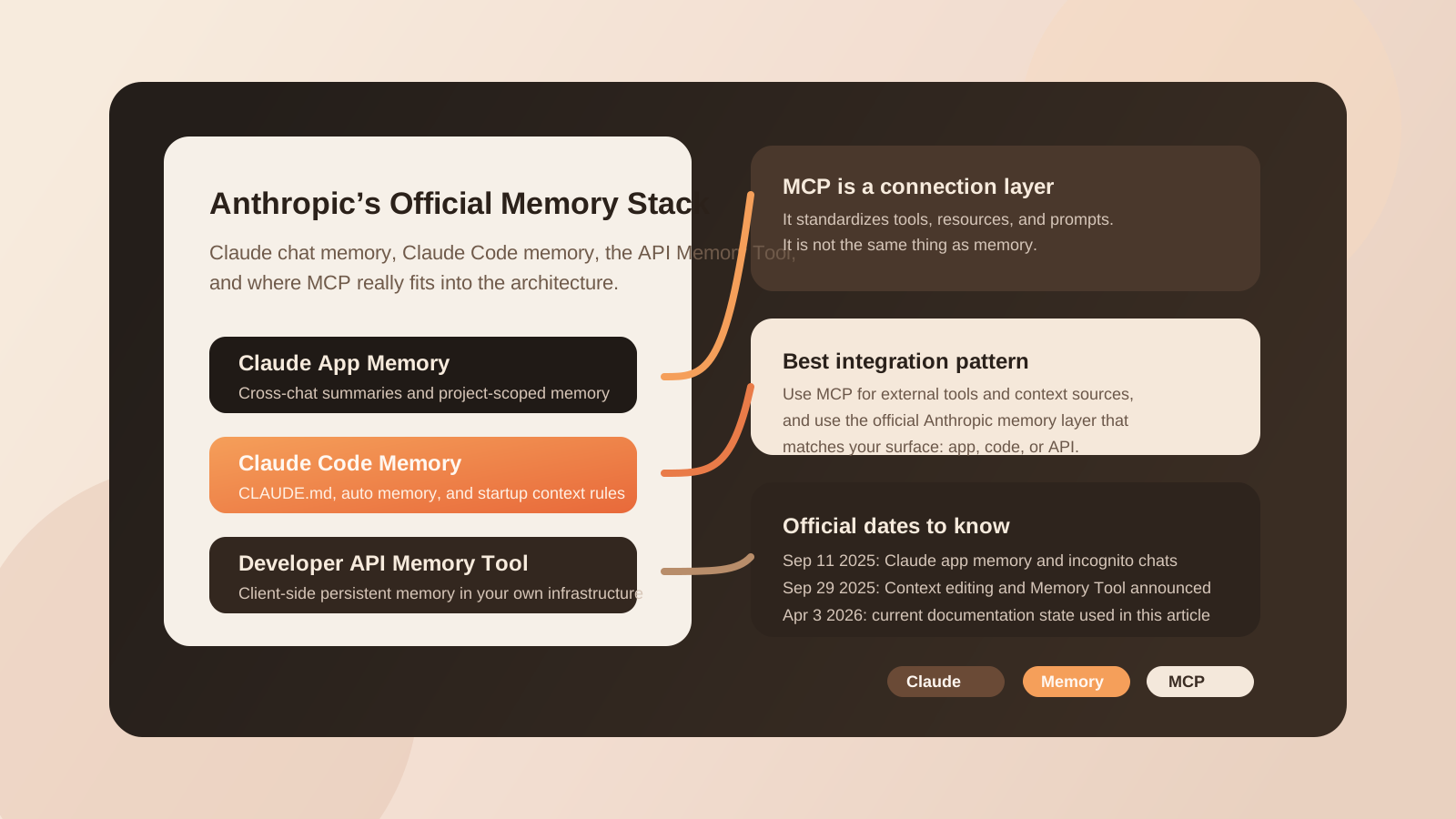
First, there is Claude app memory. This is the product-level memory system inside Claude itself. According to Anthropic's help documentation, Claude can search across previous chats, build a memory summary from chat history, and keep separate memory spaces for projects. This is designed for continuity across everyday use in Claude on web, desktop, and mobile.
Second, there is Claude Code memory. Anthropic documents this as a startup-context and workflow-memory system built around files such as CLAUDE.md, MEMORY.md, and auto-memory. This is not a consumer chat feature. It is a developer-facing persistent context layer for coding workflows.
Third, there is the Memory Tool in the Claude developer platform. Anthropic introduced it as part of its context-management work. This is a tool-driven, file-based memory system that lives on your own infrastructure. It is meant for long-running agents, explicit persistence, and controlled retrieval outside the active context window.
Fourth, there is MCP, the Model Context Protocol. MCP standardizes how models interact with external tools, prompts, and resources. It can absolutely be used alongside memory. But it is a connection and capability layer, not memory itself.
The precise Anthropic framing
Memory answers: What should persist beyond the current conversation or task window? MCP answers: How does Claude connect to tools, resources, and external context in a standardized way? Mixing those concepts leads to bad architecture quickly.
2. Claude chat memory in the app: search, summaries, and project separation
Anthropic's support documentation describes Claude memory in the app as an extension of the traditional chat model. Claude can search older conversations, surface relevant prior context, and synthesize memory summaries from chat history. That matters because Anthropic is not simply storing raw transcripts and hoping retrieval works magically. It explicitly describes summary-based memory behavior.
According to the official help center, Claude generates a memory summary for chats outside projects and updates that summary roughly every 24 hours. Projects receive their own separate memory space and project summary. That separation is one of the most important design choices in the entire memory stack. It prevents personal or general context from blending carelessly into project-specific work.
Anthropic also documents user controls that are critical in real-world use. Memory can be paused. It can be reset. And users can create incognito chats that do not feed into memory. This is not a minor convenience feature. It is part of the governance layer. Once teams use Claude for sales conversations, client strategy, recruiting, legal review, or sensitive internal research, selective exclusion becomes essential.
From an architecture perspective, app memory should be understood as a managed product capability. Anthropic controls the memory experience, update behavior, user settings, and surrounding product logic. That is very different from the developer platform, where Anthropic gives you building blocks and expects you to design your own persistence pattern.
| Layer | What persists | Who controls it | Best use case |
|---|---|---|---|
| Claude app memory | Chat summaries, project summaries, prior conversation context | Anthropic product layer | Continuity across Claude chats |
| Claude Code memory | CLAUDE.md, MEMORY.md, auto memory |
Project workspace and user workflow | Persistent coding instructions and project notes |
| Memory Tool | File-based memories stored on your infrastructure | Your application | Long-running agents and explicit state management |
| MCP | Tools, prompts, resources, connectors | Protocol and integration layer | Access to external systems and structured capabilities |
3. Claude Code memory: startup context, not generic chat memory
Anthropic's Claude Code documentation is unusually concrete here. Claude Code loads persistent context at the start of a conversation. That includes file-based instruction systems such as CLAUDE.md and auto-generated memory. Anthropic explicitly frames these as context, not as absolute forced configuration. That distinction matters because many teams treat these files as if they were policy engines. In practice, they work better as concise, high-signal context layers.
Anthropic also documents practical size constraints. A CLAUDE.md should remain short and focused. The most interesting official detail concerns MEMORY.md: Claude Code only loads a limited portion of it automatically at startup. The documentation advises keeping that file tight and moving excess detail into topic-specific supporting files. That is an important official design principle: persistent context should stay structured, compact, and prioritized.
This is one of the reasons why saying “I want MCP memory in Claude Code” can be misleading. Claude Code already has an official memory model. MCP can extend Claude Code with access to external tools or resources, but it does not replace the first-class memory layer Anthropic already documents for code workflows.
4. The Memory Tool in the developer platform: explicit persistent memory for agents
The most important source for builders is Anthropic's announcement on managing context in the Claude developer platform. Anthropic introduced the Memory Tool as a file-based memory system that sits outside the active context window. Claude can create, read, edit, insert, rename, and delete memory files. The crucial implementation detail is that this memory directory lives on your own infrastructure.
That makes the Memory Tool fundamentally different from Claude app memory. App memory is product-managed. The Memory Tool is application-controlled. Anthropic is not saying “Claude will now remember everything forever.” It is giving developers an official, documented mechanism for persisting knowledge outside the prompt window while keeping infrastructure ownership on the application side.
The documented operations matter because they reveal the intended usage model. Anthropic does not present memory as a hidden vector database or an opaque summary cache. It presents memory as a controlled file system for durable notes, task status, distilled findings, and reusable state. That is especially useful for research agents, coding agents, workflow agents, and assistants that need to survive across many turns.
Anthropic also ties the Memory Tool directly to context management. In the official announcement, Anthropic says that the combination of context editing and the Memory Tool produced a 39% performance improvement in an internal evaluation compared with baseline behavior. Context editing alone delivered 29%. In a 100-turn web-search test, context editing reduced token usage by 84%. Manufacturer metrics always need context, but the architectural lesson is clear: active context and long-term state should be treated differently.
Simplified conceptually, this layer looks like a tool declaration such as memory_20250818 plus the relevant context-management beta support. The exact parameter and beta-header details should always be checked against the latest official API documentation before deployment.
Anthropic also highlights a security issue that should not be ignored: path traversal protection. If the model can generate file paths, the application must ensure that all read and write operations stay inside the intended memory directory. This is one of the clearest lines between a demo and a production-grade implementation.
5. Where MCP officially fits
Anthropic's MCP documentation makes the role of MCP fairly clear. MCP is the standard way to expose tools, prompts, and resources to the model. In the Messages API, Anthropic documents an official MCP connector for remote MCP servers. In the current documentation state, this route uses a beta header tied to the MCP client integration version.
Just as important is what the documentation says MCP is not. The connector is primarily about giving Claude access to external tools and systems through a standard protocol. Anthropic also notes that for local stdio servers, MCP prompts, MCP resources, or more control, developers should use client-side helpers in the SDK rather than relying only on the simple remote-server connector path.
That is why “MCP memory” is often an imprecise phrase. You can absolutely expose a memory-like service through MCP. You can use MCP to connect Claude to a note store, knowledge layer, CRM, vector retrieval system, issue tracker, or custom persistence service. But that does not make MCP itself the memory layer. It remains the protocol that standardizes access.
The most practical way to think about it is this: use MCP when you want Claude to talk to external systems in a portable, structured way. Use Anthropic's official memory layers when you need persistence semantics that Anthropic explicitly documents for Claude, Claude Code, or the API.
6. The clean implementation pattern for real projects
If you want the most robust architecture, separate the layers instead of collapsing them into one oversized integration.
- For Claude app workflows: rely on Anthropic's native chat memory, project memory, and incognito controls where the work actually lives inside Claude.
- For Claude Code workflows: use
CLAUDE.md,MEMORY.md, and auto-memory as your persistent coding context, keeping those files concise and structured. - For API agents: use the official Memory Tool for durable state, task continuity, and controllable long-term notes on your own infrastructure.
- For external system access: use MCP to connect Claude to tools, prompts, and resources such as databases, search systems, file services, and business applications.
The common mistake is trying to force everything through MCP just because MCP sounds like the universal integration surface. It is a powerful standard, but not every persistence problem should be solved by inventing a custom MCP-based memory abstraction when Anthropic already provides an official memory layer for the relevant surface.
7. Security, governance, and data handling implications
Three risks matter most in practice. First, scope contamination. Personal conversation memory, coding instructions, and agent-state persistence should not all land in the same storage pattern. Second, path and write control. For the Memory Tool, file access must be constrained tightly. Third, governance assumptions. MCP authentication, connector permissions, and product memory behavior should all be validated against the latest official Anthropic documentation before enterprise deployment.
In fact, one of the strengths of Anthropic's current design is that these layers are separated. Claude app memory has product controls and user settings. Claude Code memory is explicit and workspace-oriented. The Memory Tool stays on your infrastructure. MCP gives you standardized access to external systems. That separation is not accidental complexity. It is what makes governance possible.
8. Final take: the official Anthropic integration is a layered system, not a single feature
The best way to summarize the official Anthropic approach today is simple: Claude app memory is for continuity in conversations, Claude Code memory is for persistent coding context, the Memory Tool is for long-running developer-controlled agent memory, and MCP is the protocol that standardizes access to tools and resources.
That is why the question should not be, “Does Claude have memory through MCP?” The better question is, which Anthropic memory layer fits my use case, and where should MCP complement it? If you answer that correctly, you end up with a cleaner architecture, clearer permissions, and a much more maintainable system.
Research date: April 3, 2026.
Official sources: