Many SEOs check Google Search Console constantly and barely look at Bing Webmaster Tools. I did the same for a long time. When I set up Statistiken Aktuell, a German statistics and data portal, Google was the dashboard I watched first. Then I opened Bing Webmaster Tools and realized I was missing a meaningful part of the picture.
Over a three-month window, Bing delivered more than 5x as many clicks as Google for this site. The more interesting part, though, was the additional layer of visibility Bing exposed: AI citations from Microsoft Copilot and related experiences, surfaced through Bing's AI Performance report. That data does not appear in Google Search Console.
This article walks through the numbers, explains why Bing may have outperformed Google in this case, and shows how to set up Bing Webmaster Tools in a couple of minutes if you already use Search Console.
The Numbers That Changed My Perspective
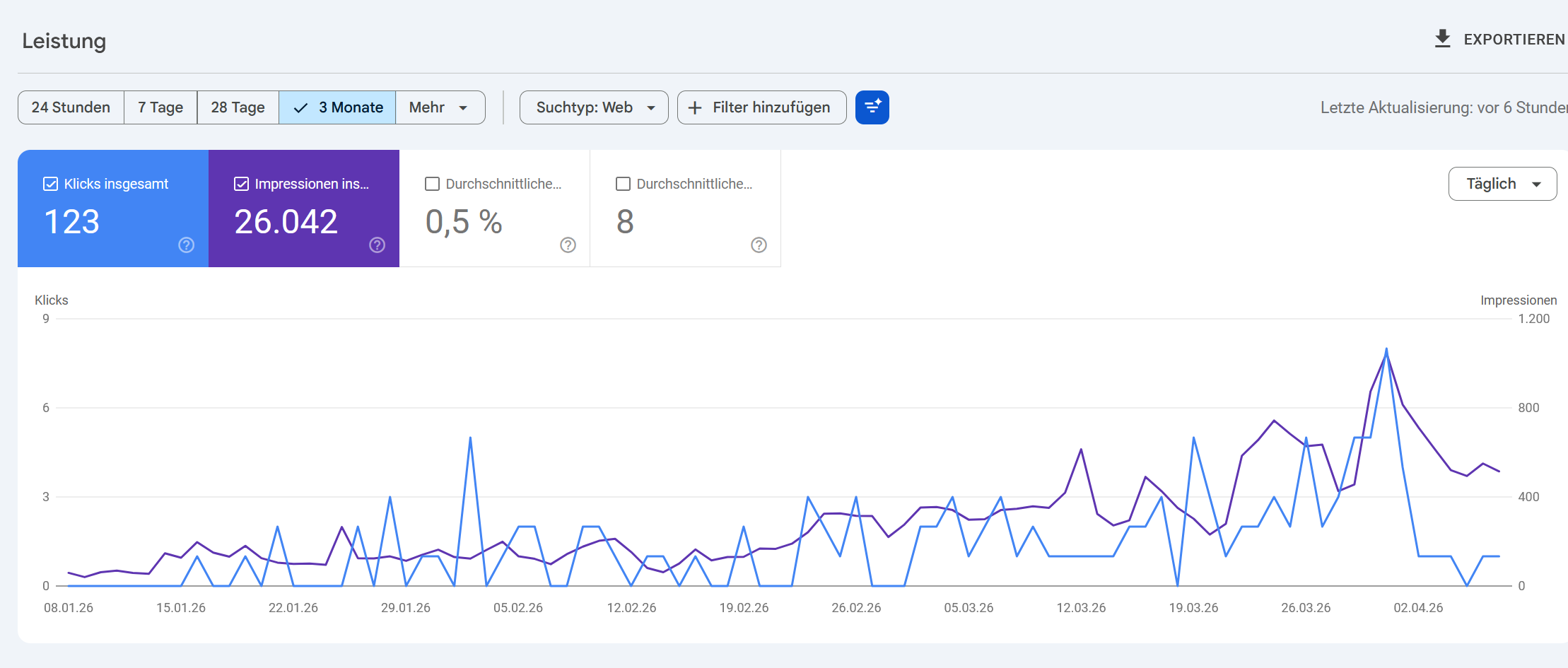
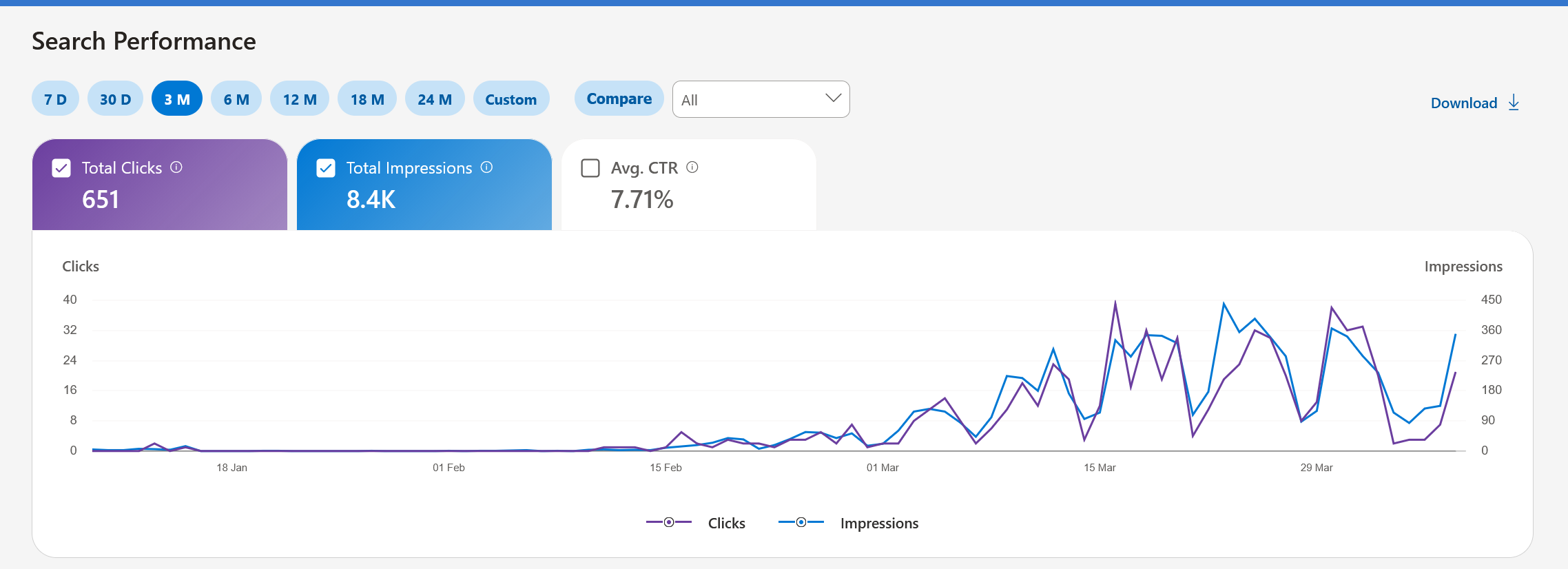
Let me put the raw data on the table. Same site, same three-month period, same content—just two different search engines and one AI citation layer:
26,042 impressions · 0.5% CTR · Avg. position 8
8,400 impressions · 7.71% CTR
Average 9 cited pages per day across AI experiences
The gap is large enough that it changes how you interpret the site's performance. Looking only at Google Search Console, I would have underestimated both its organic traction and its visibility in AI-assisted search experiences. Bing did not just add another traffic source here; it changed the diagnosis.
Setup Takes Less Than Two Minutes
One reason many SEOs postpone Bing Webmaster Tools is the assumption that it adds another round of verification work. In practice, setup is straightforward. If you already use Google Search Console, you can usually get started in under two minutes without touching DNS or uploading verification files.
Sign Up With Your Google Account
Head to bing.com/webmasters and click "Get Started." You will see three sign-in options: Microsoft account, Google account, or Facebook account. That is it—no separate registration form, no email confirmation loop, no waiting for approval. If you choose your Google account (which I recommend for the seamless import), Bing pulls your name and email automatically. You are signed in within seconds.
Import Everything From Google Search Console
Once signed in, Bing shows an "Import" option that connects directly to your Google Search Console account. Authorize the Google account that owns your GSC properties, review the available sites, select the ones you want, and click Import. Bing allows you to import up to 100 sites in one step.
The useful part is what happens next: Bing can verify site ownership automatically based on your existing Google verification. In many cases that means no extra DNS records, no meta tags, and no HTML verification files. Bing also imports existing sitemaps from GSC, which helps it start crawling with the right structure immediately.
What Gets Imported Automatically
When you import from Google Search Console, Bing transfers your verified site ownership status, associated sitemaps, and site roles. Your Bing account supports up to 1,000 sites total, and you can repeat the import from different Google accounts if you manage properties across multiple accounts. Note that analytical data (clicks, impressions, queries) does not transfer—Bing collects its own data independently.
Here is the step-by-step walkthrough:
Bing periodically re-validates your ownership by syncing with Google Search Console. As long as your GSC access remains active, your Bing verification stays valid automatically. If you ever revoke Google access, you can switch to alternative verification methods like CNAME records or meta tags.
Why Bing Outperformed Google for This Site
This is one site and one three-month window, not a universal law of search. But the pattern is plausible, and several structural factors can explain why a small, technical site may perform better on Bing than on Google:
Less competition in niche verticals. Bing's search results are often less saturated than Google's. Where Google surfaces ten nearly identical results from high-authority domains, Bing rewards relevant, well-structured content even from smaller publishers. For technical, data-heavy topics—like the statistics and data content on Statistiken Aktuell—this creates a significant advantage for sites that produce genuinely useful content.
Higher CTR from better SERP positioning. The 7.71% CTR on Bing compared to 0.5% on Google tells its own story. Google placed this site at an average position of 8—essentially the bottom of page one. On Bing, the same content appears to rank in the top 2–3 positions for many queries, which explains the dramatic CTR difference. Bing's ranking algorithm weighs different signals, and for certain content types, it produces very different results than Google.
Bing's user base is larger than you think. Bing holds roughly 10.5% of the U.S. search market, with desktop market share exceeding 17%. More importantly, Bing is the default search engine in Microsoft Edge, Windows Search, and Microsoft Copilot—products used by hundreds of millions of enterprise and consumer users daily. Most of these users never change their default search engine, creating a large, loyal audience that many SEOs ignore entirely.
Copilot integration creates an additional visibility layer. Microsoft Copilot exposes web content inside a growing Microsoft ecosystem. When your pages are used as citations, you gain distribution in places that do not show up in standard Google-centric reporting. That does not guarantee referral traffic, but it does expand where your content can surface.
Enterprise and professional audiences. Bing's user demographics skew toward business professionals who use Microsoft 365 and Windows in corporate environments. For B2B content, technical documentation, and professional tools, this audience alignment can produce conversion rates that exceed what Google traffic delivers.
The AI Citations Feature: What Google Cannot Show You
In February 2026, Microsoft launched the AI Performance report as a public preview in Bing Webmaster Tools. For publishers who want first-party visibility into AI-generated answer surfaces, it is currently one of the most useful reports available.
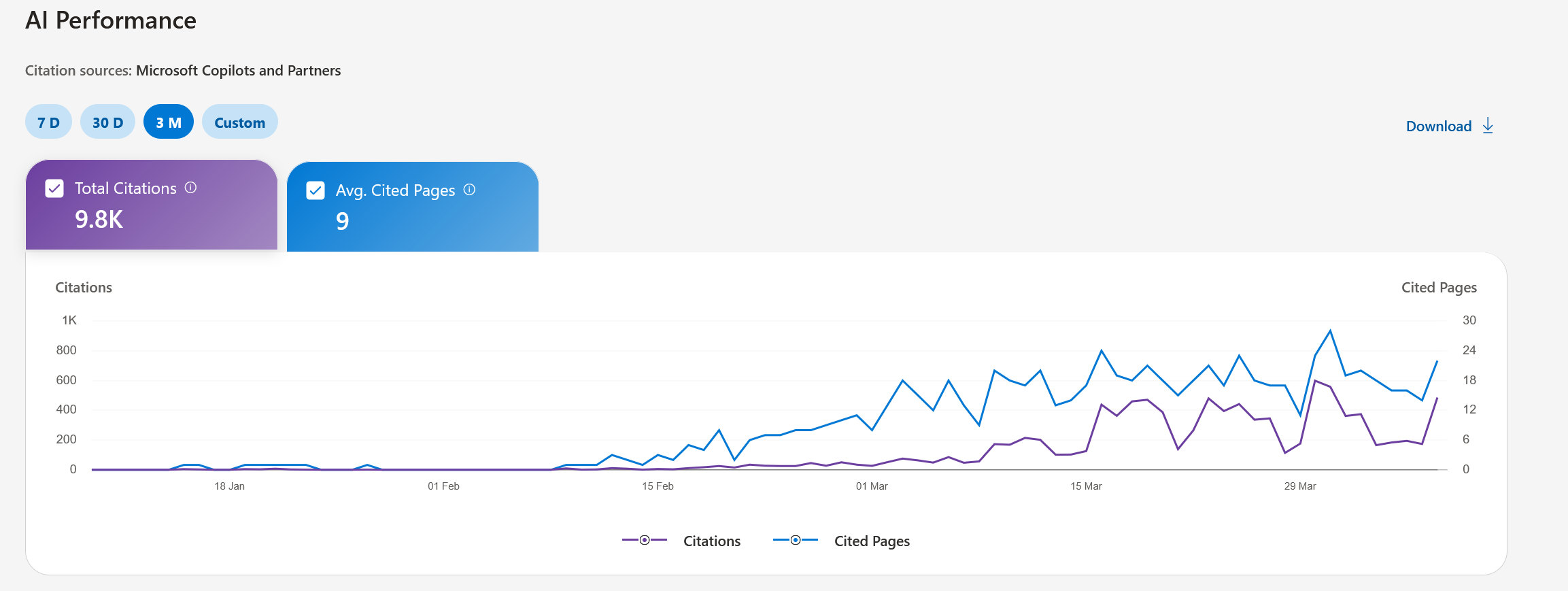
The report tracks citations across three AI surfaces: Microsoft Copilot (in Windows, Edge, Microsoft 365, and the standalone app), AI-generated summaries within Bing search results, and select partner integrations that use Microsoft's AI infrastructure. Here is what the dashboard provides:
Total Citations
How often your content was displayed as a source in AI-generated answers during a selected timeframe. This is the headline metric—it shows your content's reach in the AI ecosystem.
Average Cited Pages
The average number of unique pages from your site cited per day. This measures content breadth: are AI systems pulling from one page or many? A higher number means more of your content is AI-relevant.
Grounding Queries
The internal search phrases AI systems use when retrieving your content. These are not standard user search queries, but they can show how Bing's AI systems interpret and categorize your content.
Page-Level Data
Citation counts broken down by specific URL, showing which pages are cited most frequently. This lets you identify your strongest AI-facing content and double down on what works.
The report also includes a timeline view that reveals how citation activity changes over time. You can see the impact of content updates, new publications, and external events on your AI visibility. For my site, the timeline showed a steady upward trend as more content was published and indexed.
Why This Report Matters
Google Search Console still gives you the best baseline for traditional Google search performance. But it does not tell you how often your content is cited inside Microsoft's AI surfaces. Bing's AI Performance report fills part of that gap. It is still a public preview with clear limitations—no click-through data from citations yet and no public API—but it adds a layer of visibility that is hard to get elsewhere.
What Makes Bing Webmaster Tools Unique Beyond AI
The AI Performance report is the headline feature, but Bing Webmaster Tools has several other capabilities that Google Search Console simply does not offer:
Exact keyword data. Unlike Google, which increasingly groups keywords and hides exact queries behind "(not provided)," Bing still provides granular, exact keyword data. For a small site trying to understand which specific terms drive traffic, this transparency is invaluable for content strategy.
Competitor backlink analysis. Bing's "Backlinks for any site" tool lets you check not just your own backlink profile, but also those of any competitor. Google removed comparable functionality from Search Console years ago, and typically you would need a paid tool like Ahrefs or Semrush for this. Bing gives it to you free.
Detailed SEO error reports. Bing provides specific, actionable error reports based on SEO best practices, with concrete recommendations for each issue. Where Google's coverage reports are often generic ("Crawled but not indexed" with little explanation), Bing tells you exactly what it found wrong and how to fix it.
Instant indexing via IndexNow. Bing is the primary supporter of the IndexNow protocol, which notifies search engines of content changes in real time. When you publish or update a page, Bing can re-crawl and re-index it within minutes. Compare that to Google, where you might wait days or weeks for Googlebot's next visit, even after manually requesting indexing in GSC. For time-sensitive content, this speed difference matters enormously.
Microsoft Clarity integration. Bing Webmaster Tools integrates natively with Microsoft Clarity, a free user behavior analytics tool that provides heatmaps, session recordings, and scroll-depth analysis. You can connect Clarity directly from the Bing dashboard to understand not just how users find your site, but how they interact with it once they arrive—all without paying for a separate analytics tool.
Crawl control. Bing gives you fine-grained control over when and how aggressively Bingbot crawls your site. You can set crawl rates, define peak and off-peak hours, and prevent crawling during high-traffic periods. Google offers limited crawl rate controls, but Bing's implementation is more transparent and configurable.
Grounding Queries: A New Kind of Keyword Intelligence
One metric in the AI Performance report deserves special attention: Grounding Queries. These are not the keywords users type into a search box. They are the internal queries that AI systems generate when they need factual information to answer a user's question.
For example, a user might ask Copilot: "What is the best way to track website analytics?" Copilot does not just search for that exact phrase. It generates internal grounding queries like "website analytics tracking tools comparison" or "free analytics platforms features" to find relevant content. Bing's AI Performance report shows you a sample of these grounding queries that led to your content being cited.
This is a different kind of keyword intelligence. Traditional keyword research tells you what people type. Grounding queries give you a signal about how AI systems map your content to information needs. When those two views diverge, you may have a useful prompt for revision, internal linking, or clearer topical framing.
Practical Tips: Optimizing for Bing and AI Citations
Based on this dataset and the way Bing presents the report, these are the practical adjustments I would prioritize for both Bing visibility and AI citation likelihood:
Structure content with clear headings and tables. AI systems strongly prefer content that is well-organized with descriptive H2/H3 headings, comparison tables, and clearly labeled data points. Content that is easy for a language model to parse and extract facts from gets cited more frequently.
Support claims with evidence. AI models are trained to prefer authoritative, evidence-backed content. Include specific numbers, data points, dates, and source references in your content. Vague statements get skipped; precise statements get cited.
Implement IndexNow. Fresh content gets indexed faster by Bing, which means it enters the AI citation pool sooner. If your CMS supports IndexNow plugins (WordPress, Yoast SEO, and many others do), activate them. For custom setups, the IndexNow API is straightforward to implement.
Use proper Schema markup. Structured data helps Bing understand your content's entities, relationships, and context. Article schema, FAQ schema, and How-To schema all improve how Bing processes and presents your content in both traditional search and AI surfaces.
Maintain multimedia consistency. According to Microsoft's own guidance, content that is consistent across text, images, and other media formats performs better in AI citation selection. If your article discusses a topic, make sure your images, alt texts, and captions reinforce the same information.
Publish regularly and update existing content. The AI Performance timeline for my site showed a clear correlation between content freshness and citation frequency. Pages that were recently updated received more citations than older, static content. AI systems appear to favor recently confirmed information.
What This Means in Practice
This experiment reinforced a principle I keep rediscovering: Google is not the only search engine that matters. For smaller, niche sites in particular, Bing can be a dominant traffic source that goes completely unnoticed if you never log in.
The AI citation layer makes the case stronger. Even if citations do not map one-to-one to visits, they show where content is being used, summarized, and surfaced inside Microsoft's ecosystem. For a smaller publisher, that is strategically useful information.
Here are the key takeaways from this analysis:
- Set up Bing Webmaster Tools if you have not already. If your sites are already verified in Google Search Console, the import path is fast and low-friction.
- Check AI Performance regularly. Even in preview, it is one of the clearest first-party views into how your content is cited in Microsoft's AI ecosystem.
- Do not assume Google metrics tell the full story. On this site, a Bing-first view would have led to a very different conclusion about search performance.
- Optimize for both Bing and AI citation selection. Clear structure, evidence-backed content, IndexNow integration, and proper Schema markup all improve performance across Bing's traditional search and AI surfaces.
- Monitor Grounding Queries. They can reveal how AI systems interpret your content and where your topical framing may be stronger or weaker than expected.
- Consider Bing's unique tools. Free competitor backlink analysis, exact keyword data, Microsoft Clarity integration, and granular crawl control are all features you cannot get from Google Search Console alone.
Bottom Line
If you only look at Google Search Console, you may miss meaningful performance signals from Bing and Microsoft's AI surfaces. Bing Webmaster Tools is quick to set up, gives you a second search benchmark, and now adds citation data that broadens how you evaluate content visibility. Even if your results are less dramatic than mine, it is worth having the data.